The message usually lands at the worst possible time. Spend is live. Creative just launched. A client is asking why delivery looks soft. Then someone on the team spots it: restricted on Facebook.
At that point, teams often make the same mistake. They treat the notification like a personal reprimand or a support problem. It's neither. It's an operational incident. The fastest recoveries happen when media, creative, account management, and compliance work from the same facts instead of guessing in separate tabs.
That matters because Facebook restrictions often aren't cleanly labeled. A page may be throttled while the ad account still looks active. A profile may have limits that block approvals or publishing. Organic distribution issues can bleed into paid performance. Many marketers notice reach is restricted but lack a clear diagnostic checklist, especially when subtle restrictions aren't surfaced cleanly in Meta Business Suite and viral UGC creates grey-area signals in the account environment, as discussed in this community discussion on restricted reach and paid impact.
Table of Contents
- Start with asset-level triage
- Separate organic symptoms from paid symptoms
- Create one shared incident report
- Assign roles before anyone touches support
- Know which ruleset you tripped
- Automation catches more than people expect
- Security and circumvention are different problems
- Run a cross-functional creative audit
- Hold an appeal prep huddle
- What a strong appeal includes
- Evidence beats emotion
- What doesn't work
- Keep one voice
- Build review around risk categories
- Tighten permissions and asset reuse
- Turn past restrictions into future rules
- Document the social policy outside the ad team
- Should we just create a new account
- What's the difference between restricted and disabled
- Why does performance drop even when campaigns are still live
- How long do Facebook restrictions last
- What's the best internal setup during a restriction crisis
First Response A Team Diagnostic Checklist
The first job is simple. Slow the room down.
When a team sees restricted on Facebook, people tend to jump straight into appeals, duplicate tickets, or last-minute account creation. That usually makes the situation messier. You need a factual baseline first: what asset is restricted, what capability is blocked, and whether the impact is on paid delivery, organic distribution, or both.

Start with asset-level triage
Open Account Quality and check every layer tied to active work:
Personal profile access
If the buyer or admin profile is restricted, approvals, page access, billing actions, and publishing can break in ways that look like campaign issues.Facebook Page status
Look for page warnings, recommendation limits, or content enforcement history. A page can be the main problem while the ad account looks fine.Ad account status
Confirm whether ads are disapproved, limited, or fully paused. Distinguish ad-level disapprovals from account-level restrictions.Business Manager or Business Portfolio access
If permissions or business-level trust signals are affected, multiple accounts can feel unstable at once.
Separate organic symptoms from paid symptoms
In this scenario, teams lose time. A reach drop doesn't automatically mean ad delivery is restricted.
Use a short comparison table:
| Checkpoint | What to look for | Why it matters |
|---|---|---|
| Organic post reach | Sudden feed distribution drop, recommendation loss, odd warning labels | Suggests page or content-level throttling |
| Paid delivery | Active campaigns with unusual underdelivery or review friction | Points to ad account, creative, or policy risk |
| Admin actions | Can your team publish, edit, approve, or assign roles | Exposes profile or business-level restriction |
| Audience behavior | Specific audiences no longer available or limited | Can indicate category or policy sensitivity |
If you're already juggling client reporting during this, keep one reporting owner grounded in the data. A clean log of timeline changes matters more than hot takes. Teams that already use structured Facebook ads reporting workflows usually diagnose faster because they can compare delivery, approvals, and reach without relying on memory.
Practical rule: Don't file an appeal until someone has written down the exact asset affected, the exact visible message, and the first timestamp your team observed the issue.
Create one shared incident report
Use one document. Not a Slack thread, not five screenshots in DMs.
Include:
- Time of first detection: When someone first saw the restriction or performance anomaly.
- Affected assets: Profile, Page, ad account, Business Manager, pixel-linked flow, or specific campaign set.
- Visible messages: Copy the exact wording from Account Quality or notifications.
- Operational impact: Publishing blocked, approvals blocked, spend stalled, reach reduced, or monetization limited.
- Recent changes: New creatives, landing page changes, UGC imports, audience expansion, new admins, or billing edits.
This keeps the agency lead, paid social manager, and creative lead from solving different problems.
Assign roles before anyone touches support
A calm team structure beats hustle every time:
- Media buyer: Pull active campaign impact and identify which ad sets or creatives correlate with the issue.
- Creative lead: Review the assets that went live just before the restriction.
- Account lead or ops lead: Own the incident report and stakeholder communication.
- Admin owner: Verify role permissions and access paths.
One person should document. One person should investigate. One person should communicate upward. That division prevents duplicated effort and contradictory support messages.
When a team gets restricted on Facebook, the shortest path back is clarity. Not speed for its own sake.
Understanding Why You Were Restricted
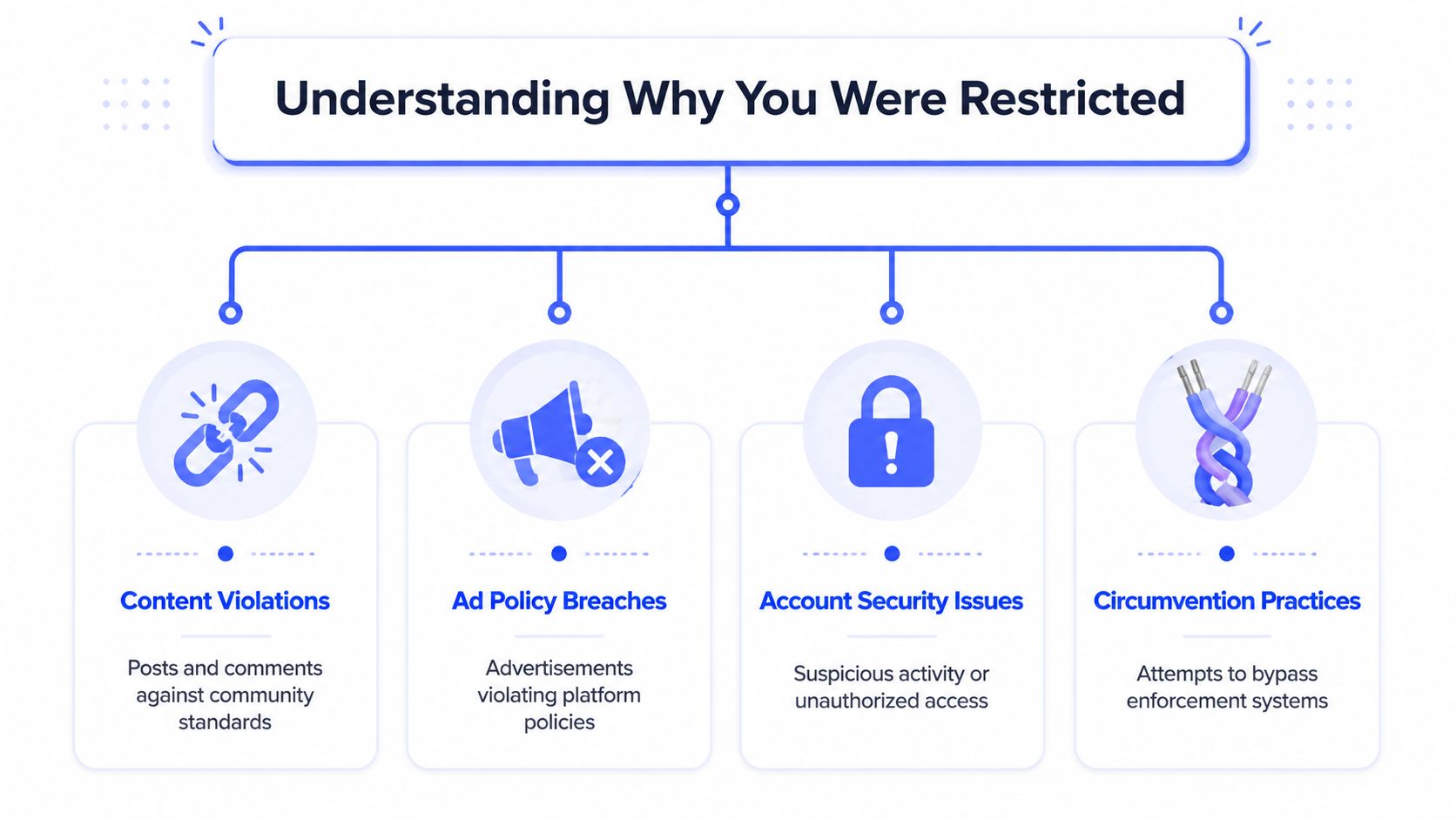
Most Facebook restrictions fall into one of four buckets: content violations, ad policy breaches, security concerns, or behavior that looks like circumvention. The problem is that Meta's notification often gives less detail than the team needs to fix the issue.
Know which ruleset you tripped
Teams often lump everything into “policy violation,” but that's too broad to be useful.
Ad Policies govern the ad itself, the copy, the creative, and the landing page experience.
Community Standards govern posts, comments, page behavior, and broader account conduct.
Content Monetization Policies affect whether certain themes can be monetized or distributed in monetized placements.
Those categories overlap in practice. A piece of UGC can be acceptable as organic content, risky as ad creative, and unsuitable for monetized inventory. That's why a creative audit has to include both the asset and where the asset was used.
Automation catches more than people expect
Meta's enforcement systems are doing the first pass long before a human reviewer gets involved. According to Meta's updated methodology, proactive detection for Bullying and Harassment or Hate Speech ranges from 60–90%, while Restricted Goods and Services runs at 87–99%. That means ad creative can be restricted or demoted when automated classifiers score it as high-risk, even without a visible strike, which is why strict internal QA matters so much, per Meta's updated methodology for proactive enforcement rates.
In plain terms, your team can feel the effects of enforcement before Meta hands you a neat explanation.
Common triggers I see teams underestimate:
- Aggressive direct-response language: Copy that sounds threatening, shaming, or overly personal.
- Borderline humor: Sarcasm or memes that drift toward bullying, hate, or harassment signals.
- UGC without context: Real customer videos often include risky language, gestures, or claims that the brand team didn't script.
- Landing page mismatch: Clean ad, messy destination. That still creates review risk.
- Sensitive vertical adjacency: A harmless aspirational reference can still sit too close to restricted goods, financial sensitivity, or contentious social themes.
If the team says, “But we didn't mean it that way,” that's a creative discussion. The classifier doesn't evaluate intent the way a human brand lead does.
Security and circumvention are different problems
Not every restriction starts with content. Some come from trust and access patterns.
If Meta sees strange admin behavior, unusual login patterns, rapid account changes, or attempts to route around prior enforcement, you may be dealing with a security or integrity issue rather than a copy issue. That's one reason I tell teams to review access hygiene during an incident, especially if multiple assets were touched in a short window. For broader context on how platform vulnerabilities and ecosystem trust issues shape enforcement posture, it's useful to read understanding the Mooncloud breach.
If the damage is isolated to a business structure problem, some teams also need to rethink how assets are organized and who owns them. This is usually a better long-term fix than patching around the issue with extra admins or ad hoc setups. A cleaner business structure starts with understanding how to create a new Facebook Business Manager correctly when your operating model requires one.
Run a cross-functional creative audit
Don't review the flagged ad alone. Review the pattern.
Ask:
- Which themes appeared repeatedly in the last launch cycle?
- Did multiple brands or accounts reuse the same UGC angle?
- Did the landing page use urgency, claims, or visuals that the ad itself avoided?
- Did comments under the post introduce moderation risk?
The best audit sessions include paid social, creative, client service, and whoever owns moderation. Restrictions usually emerge from the system, not from one careless click.
How to Prepare and Submit a Winning Appeal
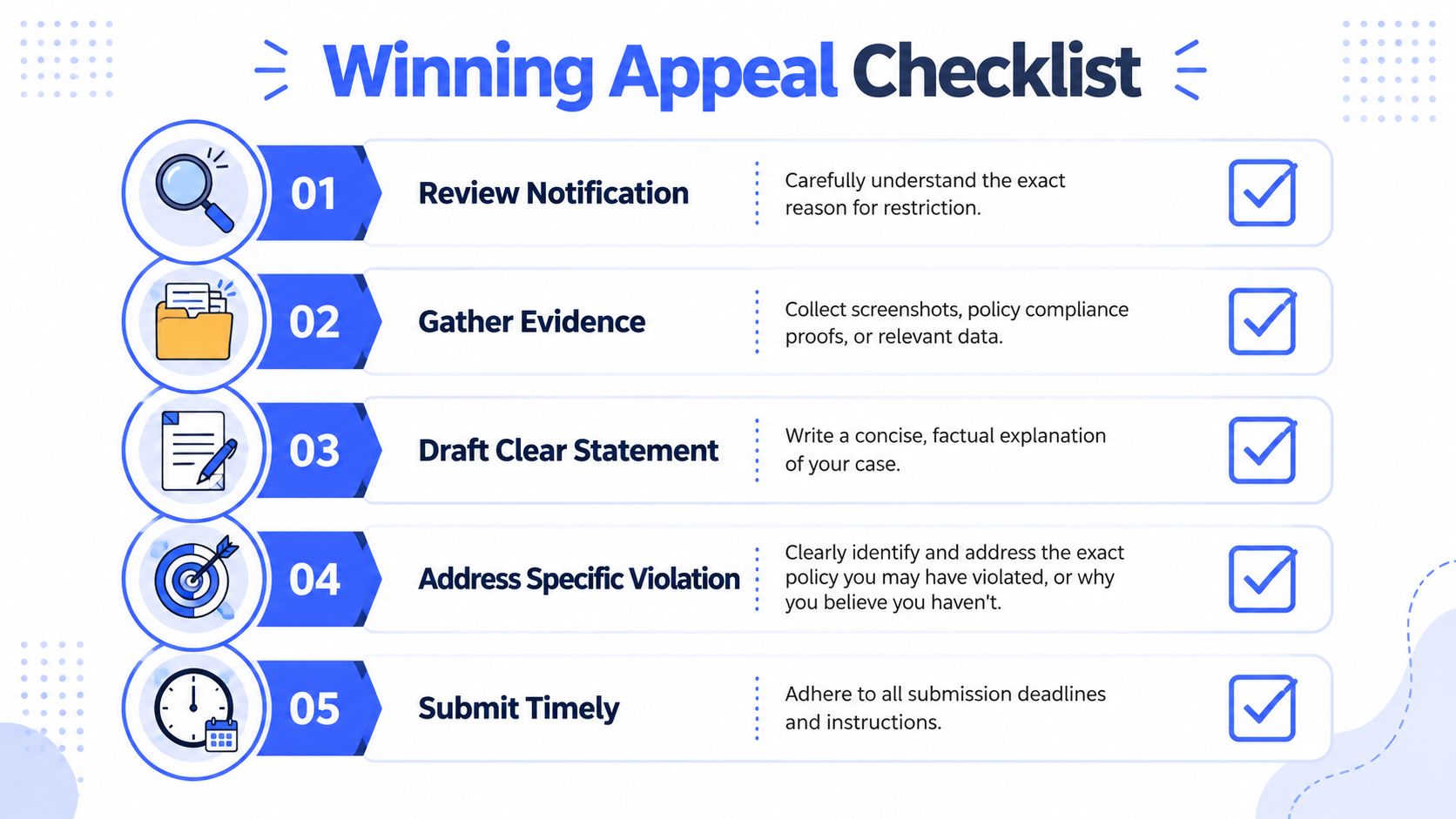
A good appeal reads like a professional incident response memo. A bad appeal reads like a frustrated comment thread.
That distinction matters because Facebook's strike system raises the cost of getting the first response wrong. Meta's account-level strike system, introduced in 2019, means repeated violations accumulate strikes, and accounts with ten or more strikes can face a 30-day restriction from creating content, according to Meta's account restriction documentation. If your team has a legitimate path to reversal, treat the first appeal like it matters. It does.
Hold an appeal prep huddle
Get the right people in one short meeting before anyone clicks Request Review.
Use this division of labor:
- Media buyer: Summarize campaign impact and identify whether the issue was ad-level, page-level, or account-level.
- Creative lead: Explain what the asset was trying to communicate and what specific edits were made after review.
- Account manager or ops lead: Draft the actual appeal and keep the language factual.
- Reviewer or compliance owner: Confirm which policy area is most likely involved and whether the evidence package is complete.
This avoids the worst appeal pattern: one person improvising with incomplete context.
What a strong appeal includes
A successful appeal is usually concise. But concise doesn't mean vague.
Include:
The exact affected asset
Name the Page, ad account, business, or ad ID.The visible enforcement action
State what Facebook says happened, using the wording shown in the platform.Your corrective action
Explain what changed. Removed asset, edited copy, updated landing page, tightened moderation, adjusted access, or paused related content.Your prevention step
Show that the team changed process, not just one ad.Your request
Ask for review of the specific restriction. Don't bury the ask.
Here's the tone you want:
We identified the flagged asset, reviewed the associated creative and destination, removed the elements that may have caused policy concern, and implemented an internal approval check before republishing. We're requesting a review of the restriction on the affected asset.
That's stronger than “Please fix this, we didn't do anything wrong.”
Evidence beats emotion
Attach proof where the workflow allows it.
Useful evidence includes:
- Updated screenshots: Revised landing pages, edited creative, removed claims, adjusted disclosures.
- Change log: A short record of what changed and when.
- Approval trail: Internal review notes or a documented content approval workflow that shows your team isn't operating recklessly.
- Context on UGC: If a customer-created asset was the issue, explain how moderation and filtering were updated.
A support reviewer doesn't need your internal panic. They need signs that the risk has been reduced.
What doesn't work
Some appeal habits hurt more than they help:
| Weak move | Why it fails |
|---|---|
| “We're a good advertiser, please reverse this” | Reputation claims aren't evidence |
| Long legal arguments with no platform context | Reviewers need clarity, not theater |
| Submitting multiple conflicting appeals | Confuses case history |
| Blaming a freelancer, intern, or client | Doesn't show operational control |
Appeal standard: Acknowledge the issue, show the fix, show the process change, ask for a targeted review.
Keep one voice
Teams handling large spend often have several people with access. That becomes a liability during an appeal.
One person should submit the appeal. One person should own follow-up. Everyone else should feed that person evidence. If three admins contact support with different explanations, you've created a credibility problem that didn't need to exist.
When you're restricted on Facebook, the best appeal isn't dramatic. It's disciplined.
When Your Appeal Is Denied Escalation Tactics
A denial doesn't always mean the case is over. It does mean the team needs to stop reacting emotionally and start operating like it's building a legal file.

Build a real case file
Meta support is inconsistent because agents rotate, context gets lost, and enforcement paths are rigid. That rigidity didn't appear by accident. Facebook's tightening of third-party data and system access between 2018 and 2019 showed a platform moving toward stricter, centralized review and tighter control, as outlined in Meta's data access and protection update.
That means your team should assume each new support interaction starts with low context.
Create one document with:
- Case IDs: Every ticket, chat, or review reference.
- Timeline: Restriction date, appeal date, denial date, follow-up dates.
- Evidence packet: Screenshots, policy references, changes made.
- Single summary paragraph: A current snapshot any new agent can understand quickly.
Ask for the right next step
There's a difference between asking for another review and asking for escalation to a specialist.
If your team made meaningful corrections after the first denial, say so directly and request re-review of the updated state. If the denial looks generic and the evidence is strong, ask whether the case can be escalated for specialist review. Keep the tone calm. Support agents are more useful when you make their job easier.
Don't treat support like a debate. Treat it like a chain of custody for facts.
A walkthrough like the one below can help teams standardize how they approach follow-up and support interactions:
Put one point person in charge
If client service is messaging one thing, the buyer is saying another, and the founder jumps into chat with a third version, your escalation path gets weaker.
Assign:
- One support owner: Handles all direct communication.
- One internal reviewer: Checks every written message before it goes out.
- One stakeholder lead: Updates clients or leadership.
Sometimes the right move is to push. Sometimes the right move is to wait through a cooling-off period while avoiding further risky edits. Teams get into more trouble when they can't tell the difference.
From Reactive to Proactive Preventing Future Restrictions
Recovery is useful. Governance is what keeps the team from doing this again next month.
The hard truth is that many Facebook restriction problems are really workflow problems. Too many people can publish. UGC moves from Dropbox to ad account with no policy screen. Landing pages change after approval. No one owns comment moderation. Then a team acts surprised when a “restricted on Facebook” issue shows up as if it came out of nowhere.
Build review around risk categories
Some content themes need stricter review even when they don't clearly violate policy. Facebook restricts monetization for categories such as debates over social issues and tragedy or conflict, according to Meta's content monetization policies. For enterprise teams, that means one-off judgment calls aren't enough. You need shared checklists and pre-flight QA before launch.
A practical model looks like this:
| Workflow stage | Owner | What gets checked |
|---|---|---|
| Creative intake | Brand or creative team | Theme sensitivity, UGC origin, claims |
| Media QA | Paid social team | Placement fit, account suitability, destination match |
| Compliance pass | Ops, legal, or senior reviewer | Restricted categories, monetization implications, escalation risk |
| Publish approval | Limited admin set | Final sign-off and audit trail |
Tighten permissions and asset reuse
A mature team doesn't let every operator improvise from scratch inside Ads Manager.
Use:
- Role-based permissions: Separate people who can draft, approve, and publish.
- Pre-approved asset libraries: Store approved variants and retire risky ones visibly.
- Template-based launches: Reduce freehand errors in copy, tracking, and destination setup.
- Version control: If someone edits a landing page post-approval, the team should know.
This isn't bureaucracy for its own sake. It's risk containment.
Turn past restrictions into future rules
Every restriction should leave behind a rule, a checklist item, or a blocked pattern.
Examples:
- A UGC clip triggered review because of language in the first three seconds. Future rule: transcribe and review hook audio before upload.
- A page warning followed a burst of provocative meme content. Future rule: separate community content from paid social asset pools.
- A landing page used urgency language that didn't match the ad. Future rule: snapshot destination pages at approval time.
Teams that recover fastest usually already have a feedback loop. They don't just remove a bad asset. They update the system that let it through.
Document the social policy outside the ad team
A lot of enforcement risk starts upstream. Founders post from the brand page. Community managers run reactive commentary. Influencer teams repurpose creator clips with little review. Paid social gets blamed later.
That's why broader governance matters. If your company doesn't yet have one, a practical starting point is this effective social media policy guide, which is useful for aligning leadership, marketing, and operations on what can and can't go live under the brand.
Prevention works when responsibility is shared. The media buyer can't be the only adult in the room.
Frequently Asked Questions About Facebook Restrictions
Should we just create a new account
Usually, no.
If the underlying problem is policy, trust, or business-level integrity, creating new assets often makes the situation worse. It can look like circumvention. It also fragments access, reporting, and support history right when your team needs control.
What's the difference between restricted and disabled
A restricted asset usually still exists in the system, but some actions are limited. That can include posting, ad interactions, approvals, recommendations, or monetization. A disabled asset is typically a more severe state with less operational access and a narrower recovery path.
For planning purposes, restricted means “stabilize and investigate.” Disabled means “document and escalate carefully.”
Why does performance drop even when campaigns are still live
Because not all enforcement is a hard stop. Some restrictions affect distribution, recommendation eligibility, review friction, or content trust rather than fully shutting off spend. That's why your team has to compare account status with actual delivery behavior instead of assuming “active” means healthy.
How long do Facebook restrictions last
It depends on the type of restriction and whether there's a review path. Some end after a platform-defined cooling-off window. Others stay in place until a review succeeds or the triggering issue is resolved. Teams should plan in scenarios, not promises: immediate recovery, delayed recovery, or contingency launch on unaffected assets.
What's the best internal setup during a restriction crisis
Use one incident doc, one support owner, and one decision-maker for publish changes. Keep creative, paid social, and account leadership in the loop, but don't let everyone operate independently. Coordination is usually what saves the account, not heroics.
If your team is managing multiple Meta accounts, launching high volumes of creative, and trying to avoid another restriction cycle, Koast is built for that operating reality. It gives teams a centralized way to manage creative, approvals, publishing, permissions, and activity logs so compliance and execution stay connected instead of drifting apart.