Most ad teams don't have a tooling problem first. They have a coordination problem.
Creative sits in Google Drive. Naming conventions live in a spreadsheet no one fully trusts. Media buyers copy winning ads across accounts by hand. Marketing ops tries to connect CRM, analytics, and campaign data, while Slack fills up with approval requests, broken links, and last-minute launch changes. The result isn't just messy execution. It's delayed launches, weak attribution, and too much paid budget managed through manual workarounds.
That's why marketing automation integration matters to ad operations teams. It isn't only about syncing a CRM to an email platform. It's about building a connected operating layer across ad platforms, creative systems, reporting, approvals, and downstream revenue data so teams can launch faster and make better decisions with less friction.
Table of Contents
- Beyond Disconnected Workflows
- Revenue improves when handoffs stop leaking value
- A shared system reduces internal drag
- Team collaboration callout
- APIs webhooks and connectors in plain language
- Source of truth is the real architecture decision
- What works and what doesn't
- CRM and lifecycle sync
- Creative asset flow
- Ad platform orchestration
- Analytics and stakeholder reporting
- Governance starts with ownership
- Role design matters more than teams expect
- AI needs controls before it needs scale
Beyond Disconnected Workflows
A familiar pattern shows up in enterprise growth teams. A campaign is ready to launch, but the approved videos are in one folder, the final copy lives in a doc, UTM rules are buried in a project thread, and the audience exclusions are sitting in a spreadsheet attachment from last week. Nobody is blocked by a single major failure. Everyone is slowed by a hundred small ones.
That manual patchwork creates hidden costs. Teams upload the wrong creative version. Account leads ask for performance updates that require another export. Marketing ops spends more time reconciling fields than improving routing or measurement. Paid social managers often become human middleware between design, analytics, and demand gen.
The shift away from that model is already well underway. By 2026, one industry synthesis reported that 95% of enterprise marketing teams use at least one marketing automation platform, and 52% of marketers said integrations were the most important factor when selecting one, according to Emarsys marketing automation statistics.
Disconnected tools rarely fail all at once. They fail in small handoff moments that compound across every launch.
For ad teams, integration means something more specific than a general martech diagram. It means approved assets flow into the systems buyers use. It means campaign metadata stays consistent across accounts. It means reporting doesn't depend on someone rebuilding context after the campaign is already live.
A practical starting point is to inventory the systems your team already relies on, then discover martech integrations that reduce manual transfer work between them. That exercise usually surfaces bottlenecks fast.
Three signals usually tell you the stack is too disconnected:
- Launches depend on heroics: A senior operator has to manually stitch together campaign inputs before anything goes live.
- Approvals lack traceability: Teams know something was approved, but not which asset, by whom, or under which naming convention.
- Performance reviews start with cleanup: Analysts spend the first part of every meeting arguing over dataset consistency instead of discussing budget moves.
When teams fix those issues, they don't just move faster. They stop wasting skilled time on avoidable coordination work.
The Business Value of a Connected Ad Stack
The strongest case for marketing automation integration isn't convenience. It's financial performance.
Organizations using marketing automation saw a 53% higher conversion rate from initial response to MQL and industry summaries described average returns of $5.44 for every $1 invested, according to EmailMonday's marketing automation statistics overview. For ad leaders, that matters because paid media only creates value when the rest of the system can capture, route, and act on demand efficiently.

Revenue improves when handoffs stop leaking value
Paid campaigns often underperform on paper because the ad itself wasn't the actual problem. Lead status doesn't update cleanly. Sales can't see meaningful engagement context. Creative insights stay trapped in the ad platform while pipeline results sit in CRM. Budget decisions then get made from partial information.
A connected ad stack closes those gaps by making customer and campaign signals usable across teams. Media buyers can see which messages are producing quality downstream actions. Marketing ops can align lifecycle stages and attribution rules. Sales leaders can trust that handoffs carry enough context to prioritize follow-up.
That changes the quality of decision-making in weekly operating reviews.
Practical rule: If paid media, CRM, and reporting teams each use a different definition of performance, integration hasn't solved the business problem yet.
A shared system reduces internal drag
One of the biggest gains is organizational, not technical. When there's a single source of truth for campaign status, engagement, and outcomes, fewer meetings turn into reconciliation sessions.
A connected setup helps teams answer questions like these without rebuilding the data story every time:
| Team | What they need to know | Why integration matters |
|---|---|---|
| Paid media | Which audiences, creatives, and offers are producing qualified demand | Better budget allocation and faster testing decisions |
| Marketing ops | Whether routing, enrichment, and lifecycle logic are working | Fewer broken journeys and cleaner attribution |
| Sales | Which leads are active and what they engaged with | Better outreach timing and context |
| Leadership | Whether spend is turning into pipeline and revenue | More credible planning and forecasting |
Team collaboration callout
For enterprise growth teams, integration moves beyond being an IT line item. Shared KPIs reduce the usual friction between acquisition, creative, and ops. Buyers stop chasing designers for the latest file. Analysts stop rebuilding reports manually. Stakeholders get consistent updates instead of one-off explanations.
The business value comes from tighter coordination. Better data helps, but only if the team can act on it together.
Understanding Core Integration Architectures
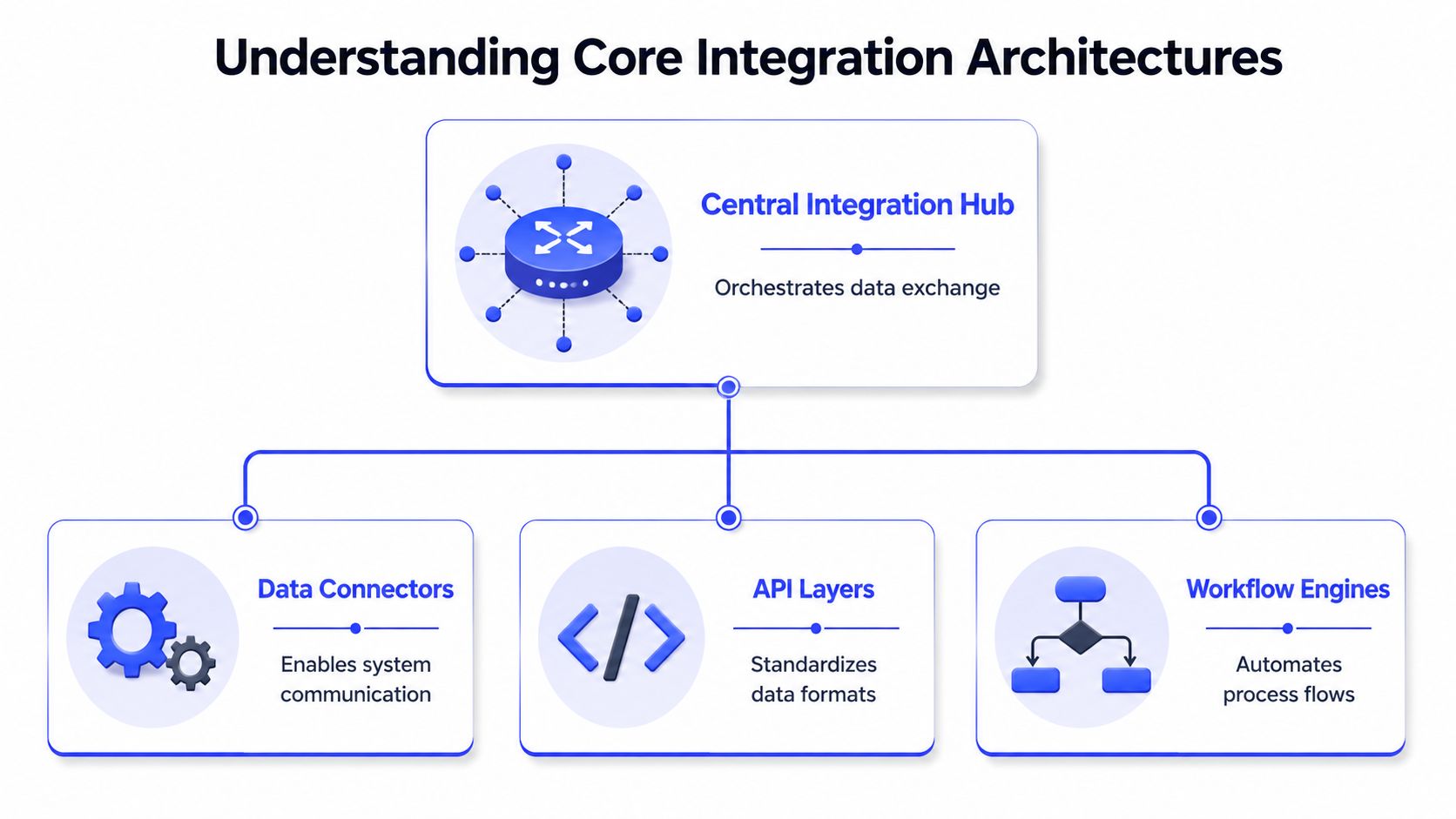
Marketing automation integration usually relies on APIs, webhooks, native connectors, and middleware, with field mapping rules defining a source of truth so systems don't overwrite one another, as explained in Storyteq's guide to marketing automation integrations.
That sounds technical, but the operating idea is simple. These components are translators and traffic controllers for software.
APIs webhooks and connectors in plain language
An API is the structured way one platform asks another platform for data or sends data into it. Think of it as a formal request and response layer. Your CRM can push lifecycle updates into an automation tool through an API. An ad management system can pull campaign metadata from another platform the same way.
A webhook is event-driven. Instead of checking on a schedule, one system sends a signal the moment something happens. A creative gets approved. A form is submitted. A record changes status. Webhooks are useful when speed matters and you don't want lag between systems.
A native connector is the prebuilt bridge vendors provide for common systems. These can save time, but they often cover the most common use cases, not the edge cases enterprise teams run into. That's where middleware or custom logic usually enters the picture.
Source of truth is the real architecture decision
Teams often spend too much time debating the connection method and not enough time deciding field ownership. That's where sync projects go sideways.
If the CRM owns account status, it should stay CRM-owned. If the ad team owns creative tags or campaign naming inputs, those shouldn't be overwritten downstream. Behavioral data such as clicks, visits, and form events also need a clear home so reporting doesn't drift.
A practical architecture review should answer these questions:
- Which system owns each core field: Contact details, lifecycle stages, opportunity data, campaign IDs, and asset metadata all need explicit ownership.
- What triggers a sync: Real-time event, scheduled batch, or manual approval gate.
- What happens on conflict: Overwrite, reject, log, or flag for review.
- Who monitors failure states: Not just engineering. Marketing ops and ad ops need visibility too.
The cleanest integration isn't the one with the most connections. It's the one where every important field has an owner and every sync has a reason.
What works and what doesn't
What works is boring by design. Limited field scope. Clear ownership. Documented mappings. Logging. Alerting. Change control.
What doesn't work is the common enterprise habit of syncing everything because it might be useful later. That creates duplicate values, bloated workflows, and reporting arguments nobody can resolve quickly. Ad teams feel that pain first because campaign execution moves faster than governance docs do.
Key Integration Patterns for Ad Ops Teams
Ad operations teams need integration patterns that support execution, not just database hygiene. The highest-value setups usually connect four areas: CRM and lifecycle data, creative asset management, ad platform orchestration, and analytics delivery.
A technically sound CRM sync should prioritize contact details, lead status and scores, engagement events, deal data, and campaign metrics because these fields directly affect routing, attribution, and personalization, according to Teamgate's overview of CRM and marketing automation data sync. For ad ops, that guidance is useful because it keeps the integration focused on decision-grade fields.
CRM and lifecycle sync
The classic mistake is trying to mirror the entire CRM into the ad workflow. Ad teams rarely need that. They need the fields that help them suppress waste, personalize intelligently, and understand what paid traffic is producing downstream.
Useful CRM integration patterns include:
- Audience suppression and inclusion: Sync lifecycle stage or customer status so teams don't keep paying to acquire people already in later stages.
- Lead quality feedback: Pass lead score or qualification status back to the team buying traffic so they can compare front-end performance with actual sales readiness.
- Opportunity context: Make campaign and source metadata accessible where revenue attribution is reviewed.
Team collaboration callout: This pattern works best when RevOps defines lifecycle stages, marketing ops owns mapping logic, and paid media agrees on how those fields affect targeting and reporting. If one team changes stage definitions without warning the others, the integration becomes misleading fast.
Creative asset flow
Creative operations are often the least automated part of paid media execution. Files move through email, chat, cloud folders, and approval threads before anyone uploads them into the ad platform. That delays testing velocity and creates version confusion.
A better pattern is direct asset flow from cloud storage or approved libraries into the campaign execution environment. That way the media team works from current assets, and creative teams don't have to resend files every time something gets reused or adapted.
What helps here:
- Approved-folder logic: Only assets in designated folders or statuses are available for launch.
- Metadata standards: Asset names, formats, markets, and approval states should travel with the file.
- Access controls: Designers, media buyers, and approvers shouldn't all have the same permissions.
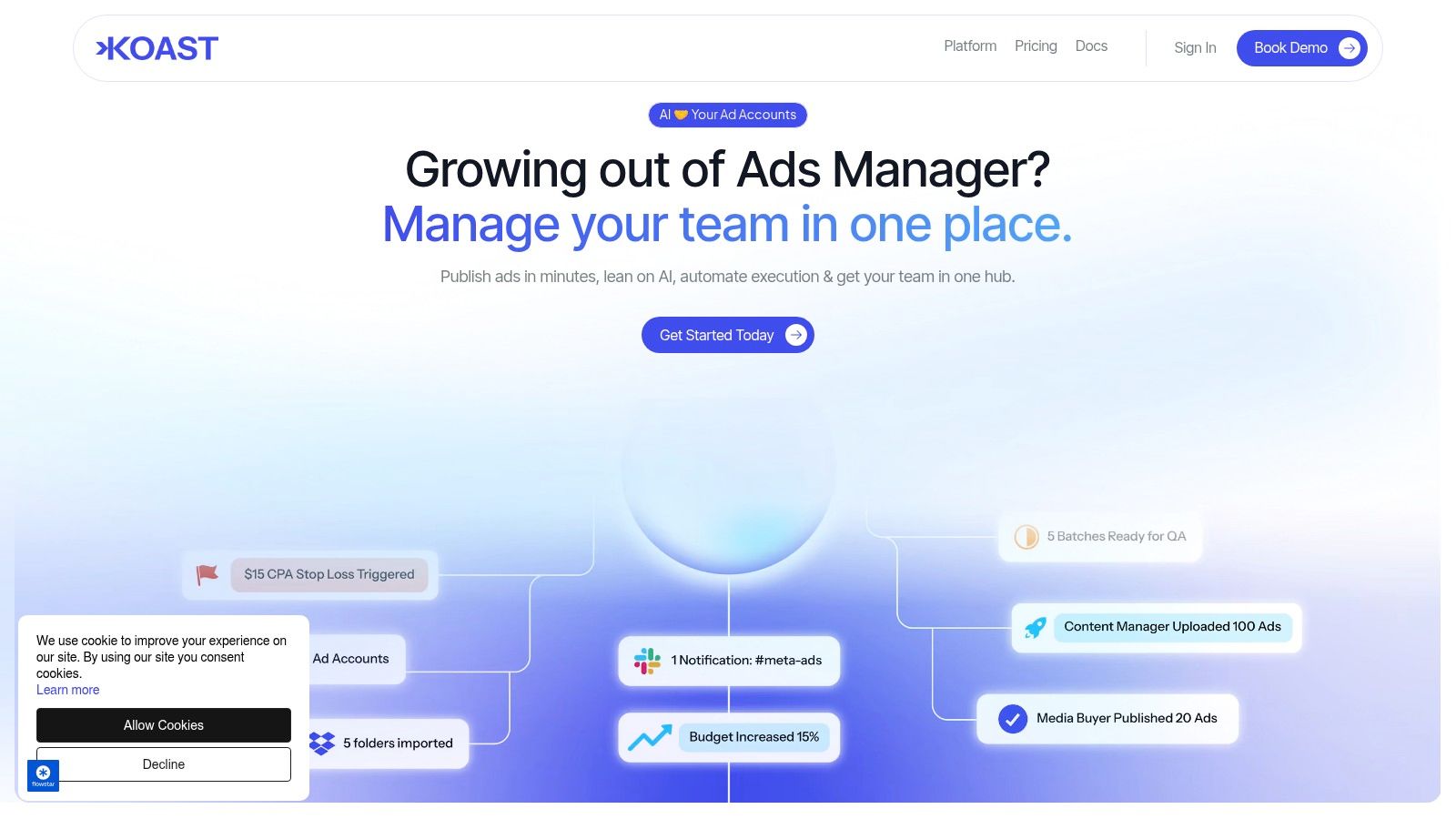
Ad-focused tools are key for streamlining operations. Platforms such as Google Drive, Dropbox, and ad workflow systems can be tied together so approved files move into launch-ready processes without repeated manual downloads and uploads. Koast, for example, supports importing creatives from cloud storage or local files into a centralized ad execution workflow.
Ad platform orchestration
Cross-account execution is where disconnected workflows become expensive. Teams duplicate winning ads manually, recreate structures from scratch, and rely on naming discipline alone to keep portfolio-wide reporting usable.
An orchestration pattern standardizes that work through templates, shared inputs, and governed publishing steps. Instead of each buyer rebuilding setup decisions independently, the team defines reusable structures for targeting, copy variants, creative combinations, and QA checks.
This matters most for enterprise teams and agencies managing many accounts at once. Collaboration improves when launch logic is standardized and visible rather than trapped in one operator's browser tabs.
A short product walkthrough helps show what this looks like in practice:
Analytics and stakeholder reporting
The last integration pattern is often treated as reporting only, but it's really an operating rhythm issue. Ad teams need intra-day visibility for optimization. Leadership needs stable business views. Creative teams need feedback they can act on. Those are different reporting jobs.
A good pattern separates operational dashboards from decision dashboards:
| Reporting layer | Primary users | Main purpose |
|---|---|---|
| Launch and pacing | Media buyers, ad ops | Spot delivery issues, monitor spend, catch broken setups |
| Creative review | Creative team, growth leads | Compare messages, formats, and themes |
| Revenue review | Marketing ops, sales, leadership | Connect campaign activity to pipeline and sales outcomes |
If every stakeholder gets the same dashboard, nobody gets the dashboard they actually need.
Team collaboration callout: Automated reports don't replace collaborative review. They make those reviews more useful. The most effective teams pair shared dashboards with a weekly cadence where paid media, creative, and ops decide together what to scale, pause, and rebuild.
Governance Security and AI Best Practices
Most integration projects break down after setup, not during it. The connections exist, but ownership is fuzzy, permissions drift, and nobody is fully sure which workflow is safe to automate. That's where governance becomes a revenue issue, not a compliance side note.
One revenue alignment perspective reported that organizations with rigorous CRM and marketing automation integration governance see 15-25% higher lead-to-opportunity conversion and 10-20% shorter sales cycles for marketing-sourced opportunities, according to Logarithmic's analysis of CRM and marketing automation revenue alignment.
Governance starts with ownership
Every shared workflow needs named owners. Not just platform admins. Owners.
For ad operations, that usually means defining who owns:
- Audience eligibility rules: Often marketing ops or RevOps, with paid media input
- Creative approval states: Usually creative ops, brand, or designated approvers
- Campaign naming and taxonomy: Often ad ops or analytics
- Lifecycle and attribution logic: Usually RevOps or marketing ops
- Exception handling: A specific person or queue for sync conflicts and failed jobs
Without that ownership model, teams fall back to informal workarounds. Those workarounds are where duplicate audiences, stale assets, and reporting disputes start.
Governance is how teams decide who can change a workflow, who approves it, and who gets alerted when it fails.
Role design matters more than teams expect
Enterprise ad teams often lump permissions into two buckets: admin and everyone else. That isn't enough when creative, media, analytics, and client stakeholders all interact with the same system.
A stronger model separates access by operational responsibility:
| Role | Typical permissions | Main risk if over-permissioned |
|---|---|---|
| Creative team | Upload assets, update labels, submit for approval | Unapproved edits reaching live workflows |
| Media buyers | Build campaigns, launch, optimize, duplicate structures | Budget or audience changes without review |
| Marketing ops | Manage mappings, workflows, data rules, QA | Broad technical changes affecting reporting |
| Admins | User management, system settings, audit review | Platform-wide misconfiguration |
Activity logs matter here. So do approval trails. In regulated categories and large organizations, "we think this was changed last week" isn't good enough. Teams need a visible history of who changed what and when.
AI needs controls before it needs scale
AI inside marketing automation can help with rules, triggers, content variation, and optimization. It can also create black-box decisions if teams don't set boundaries early.
Recent guidance on AI in marketing automation emphasizes purpose-limited consent, documented data lineage, drift and bias monitoring, and human override paths in adaptive workflows, as discussed in 4Thought Marketing's article on marketing automation integration.
That matters for ad teams using AI to assist execution or optimization. Human review should stay in place for budget decisions, audience logic changes, creative approvals, and policy-sensitive edits. AI can accelerate operating tasks, but it shouldn't be allowed to redefine the rules of the system unchecked.
For teams thinking through that balance, this discussion on AI's impact on marketing automation is useful as a planning reference.
A practical governance checklist for AI-enabled ad operations looks like this:
- Document data lineage: Teams should know which system produced each signal used in automation.
- Set override paths: A human must be able to pause, reject, or revert automated decisions.
- Limit sensitive actions: Budget changes, account access, and compliance-sensitive publishing need tighter controls.
- Review model outputs regularly: Don't assume last quarter's logic is still appropriate for current campaigns.
Your Implementation and Measurement Checklist
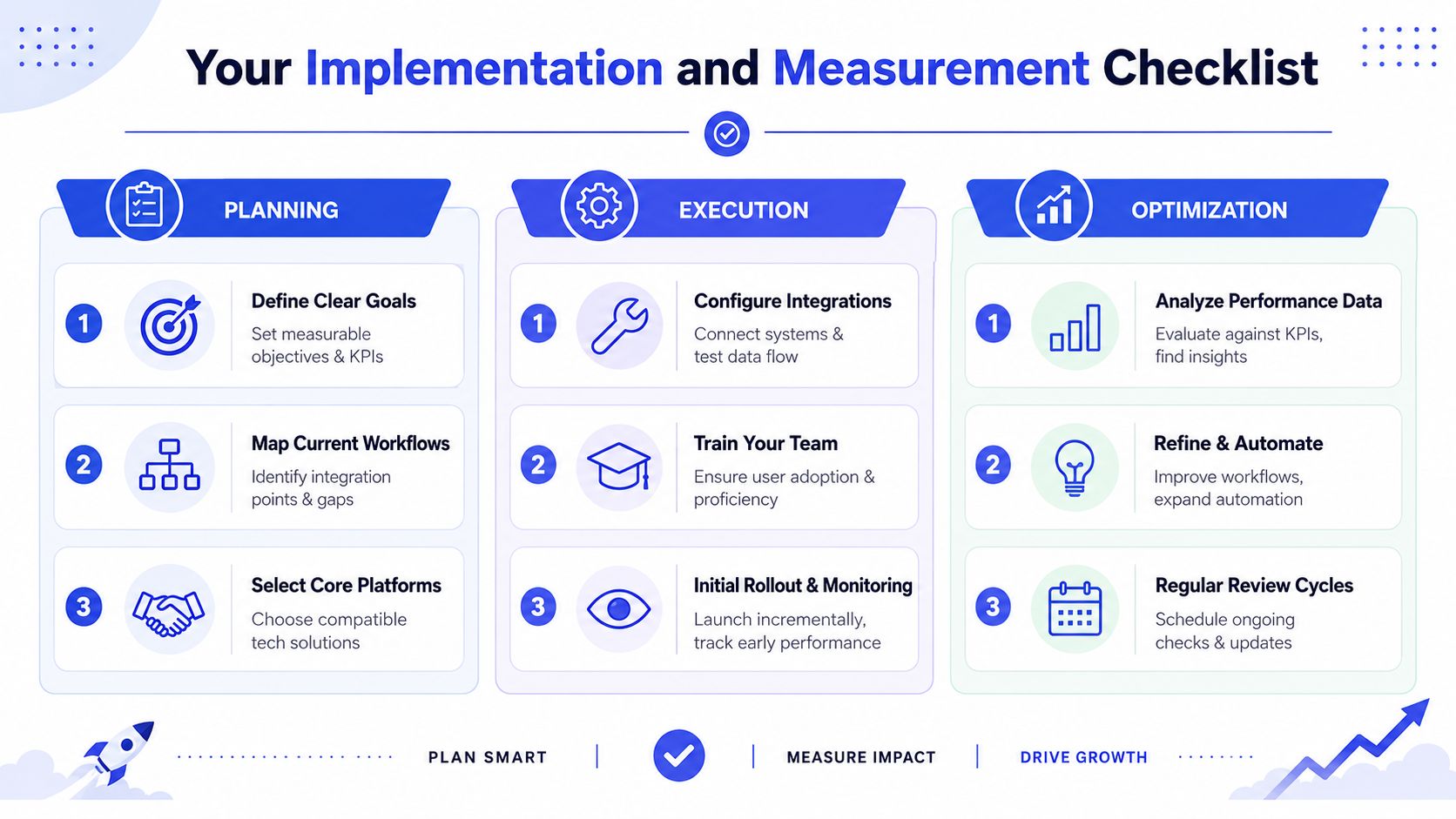
It's generally not advisable to integrate everything at once. A phased approach is preferable. Begin with the workflows that create the most operational drag or the biggest measurement gaps, then expand from there.
Planning
Begin with a stack audit. List every tool involved in campaign creation, launch, measurement, and reporting. Include the unofficial ones too, like spreadsheets, shared folders, and chat-based approval flows. Those often reveal the actual process.
Then map the key handoffs.
- Identify launch blockers: Find where teams wait for files, approvals, or field updates.
- Choose the highest-value data flows: Prioritize fields and events that affect targeting, routing, creative reuse, and revenue visibility.
- Define success upfront: Use KPIs your team already manages, such as time-to-launch, testing velocity, reporting turnaround, and cost efficiency.
A helpful planning reference is this overview of Koast AI marketing automation, particularly if you're evaluating ad execution workflows alongside broader martech integration.
Execution
Roll out integrations in a sequence that matches operational dependency. If your campaign naming is inconsistent, fix taxonomy before expanding reporting logic. If approvals are chaotic, stabilize creative intake before automating cross-account publishing.
Use a short pilot before broader rollout. Pick one market, one client pod, or one campaign type. That lets the team test field mapping, exception handling, and reporting expectations without creating unnecessary blast radius.
Common execution checks include:
- Test the happy path: Confirm the intended workflow works end to end.
- Test failure conditions: Broken asset links, missing fields, duplicate records, and rejected approvals should all be visible and recoverable.
- Train by role: Buyers need launch and optimization guidance. Creative teams need asset and approval guidance. Ops needs mapping and monitoring guidance.
Launching the integration isn't the milestone. Trusting the outputs enough to run the business on them is.
Optimization
Once the system is live, measure whether it changed team behavior. Plenty of integrations move data without improving execution.
Review the operating impact in recurring intervals:
- Workflow health: Are sync errors decreasing or being resolved faster?
- Team adoption: Are people using the shared process, or falling back to manual workarounds?
- Decision quality: Are campaign reviews faster, more consistent, and tied more closely to revenue outcomes?
- Expansion readiness: Which next integration would remove the next biggest bottleneck?
If metrics aren't improving, don't add more tools yet. Fix ownership, field design, or reporting clarity first. Most underperforming integration projects fail because the operating model stayed manual even after the software changed.
Building Your Collaborative Marketing Engine
The primary payoff of marketing automation integration isn't cleaner plumbing. It's better coordination across the people who launch, approve, analyze, and scale campaigns.
When ad teams connect creative intake, publishing workflows, lifecycle data, reporting, and governance, they stop managing paid media as a chain of isolated tasks. They start running it as a shared operating system. That's the difference between a stack that merely syncs data and one that helps teams move with control.
For some organizations, outside support can help pressure-test that operating model. A specialist AI automation agency can be useful when internal teams need help designing workflows, ownership, and automation controls. Internally, it also helps to formalize adjacent processes like a documented content approval workflow, because approval quality often determines whether the rest of the stack stays reliable.
The teams that win here usually aren't the ones with the most tools. They're the ones that make collaboration visible, governed, and repeatable.
Koast helps paid media teams replace tab-heavy ad launch work with a shared execution layer for creatives, templates, approvals, publishing, optimization, and activity tracking across multiple ad accounts. If your team is trying to turn fragmented campaign workflows into a more controlled, collaborative system, Koast is worth evaluating.