Monday morning reporting still looks the same in too many ad teams. Someone opens Meta Ads Manager, someone else pulls Google Ads, another person checks Shopify or the CRM, and by the time the spreadsheet is clean enough to share, half the team is already making decisions on stale numbers. The waste isn't just time. It's delayed reactions, mismatched metrics, and a team that spends more energy assembling the view than acting on it.
That pattern gets worse as the team grows. A single media buyer can survive on tabs and exports for a while. An enterprise growth team can't. Once you have multiple accounts, multiple stakeholders, creative review, finance scrutiny, and leadership asking for the same number in three different formats, manual reporting becomes an operating risk.
The fix isn't another dashboard alone. It's reporting automation built as a working system for the whole team. That means the data is collected consistently, transformed the same way every time, monitored for problems, and distributed in a format that helps buyers, analysts, creatives, and leadership make decisions together. Teams in adjacent industries face the same challenge. For example, the operational lessons behind GolfRep to grow golf club revenue map closely to ad operations because both depend on replacing repetitive admin work with reliable automation and better follow-up.
Good reporting automation doesn't just produce cleaner charts. It creates a single rhythm for collaborative ad management. Buyers know when to scale. Creatives know when fatigue starts. Analysts stop rechecking spreadsheet formulas. Leaders trust the numbers enough to act quickly.
Table of Contents
- Introduction From Manual Chaos to Automated Clarity
- The business case is stronger than most teams realize
- The payoff shows up in team behavior
Introduction From Manual Chaos to Automated Clarity
Manual reporting breaks in familiar ways. A buyer exports the wrong date range. An analyst updates one tab but not the summary. Finance asks why platform spend doesn't match the pacing sheet. The team loses confidence, and once confidence drops, every decision slows down because people start validating the report instead of using it.
That's why reporting automation matters most when the team is busy. The point isn't to remove human judgment. The point is to remove repetitive assembly work so people can spend their time on budget moves, creative calls, landing page issues, and launch readiness. For enterprise growth and marketing teams, that also means creating a shared operating view so media, creative, analytics, and leadership are all reacting to the same facts.
A strong setup usually changes the weekly workflow in three ways:
- Data collection becomes scheduled: APIs and connectors pull from Meta Ads, Google Ads, TikTok, Shopify, CRM systems, and other sources without waiting for a person to remember.
- Metric logic becomes centralized: blended CPA, MER, pacing, and contribution metrics are calculated once and reused everywhere.
- Distribution becomes role-specific: executives get the summary, channel leads get the diagnostics, and the working team gets alerts tied to action.
Practical rule: If your team still debates whether the report is right, you haven't automated reporting. You've only automated export collection.
The best reporting automation builds clarity into the operating cadence. It supports collaborative ad management because each person sees the same source of truth, with the right amount of detail for their role. That shift sounds simple, but in practice it's what turns reporting from a weekly chore into a daily decision system.
Why Reporting Automation Is a Core Business Driver
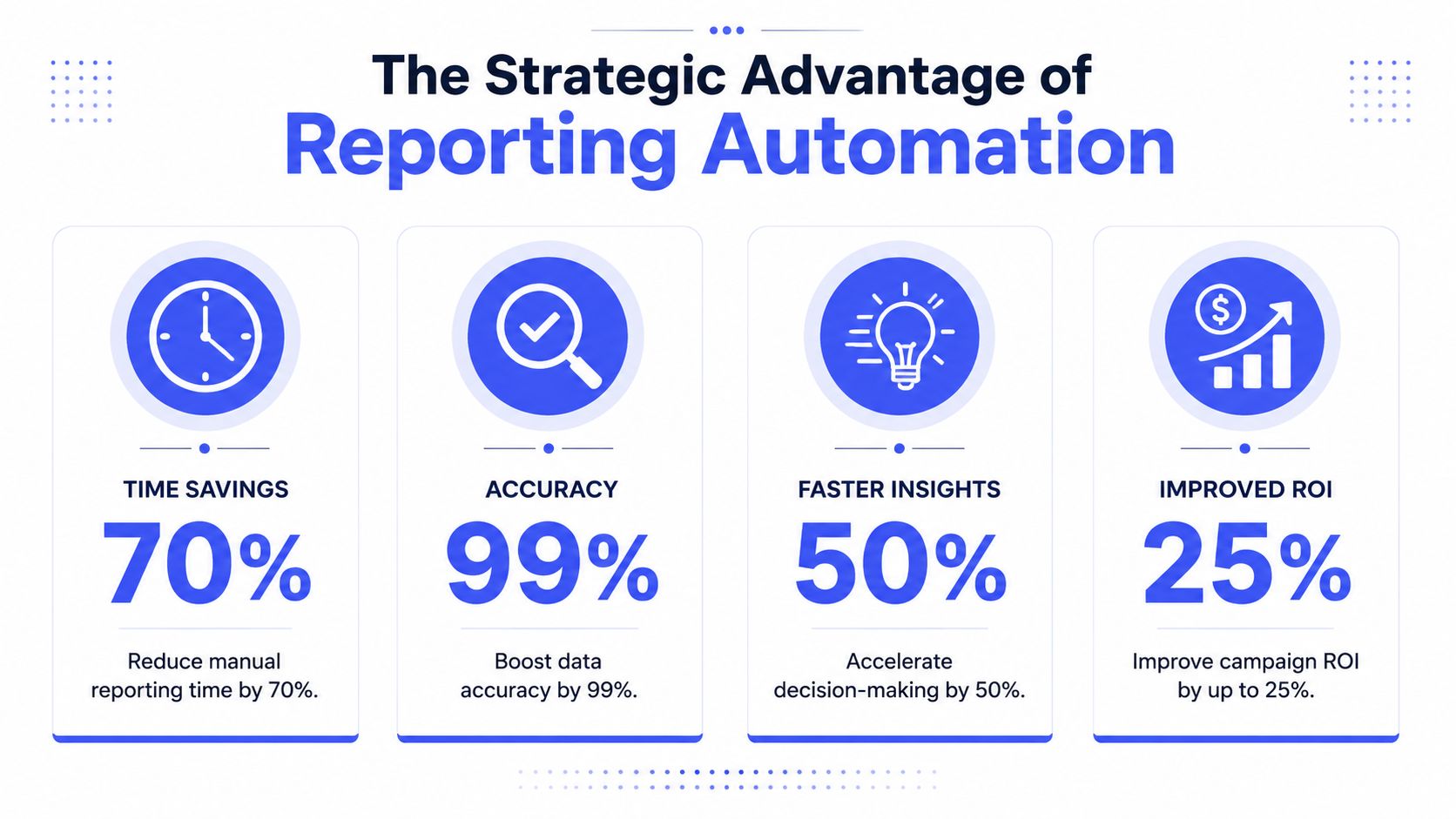
Reporting automation earns budget when you frame it as an operational investment, not a convenience feature. The market context supports that view. The global workflow automation market is projected to reach $27.91 billion in 2026, with ROI benchmarks ranging from 111% to 330% and payback periods typically under 6 months, according to workflow automation market projections and ROI benchmarks. That matters because reporting sits in the middle of spend control, launch speed, and leadership visibility.
The business case is stronger than most teams realize
Leaders usually approve reporting automation for one of three reasons. They want fewer manual errors, faster decisions, or better use of specialist time. In practice, they get all three.
When reporting is manual, expensive people do low-value work. Media buyers check dashboards repeatedly. Analysts spend hours reconciling formulas. Managers chase updates in Slack because the report hasn't landed yet. That overhead doesn't show up as a line item, but it affects campaign response time every day.
A better model is simple:
| Team problem | Manual response | Automated response |
|---|---|---|
| Spend drops or spikes unexpectedly | Someone notices late in the day | Alert goes out and owner responds |
| Leadership asks for a rollup | Analyst rebuilds summary manually | Dashboard and scheduled report already exist |
| Channel metrics conflict | Team debates source and formula | Central logic resolves the disagreement |
The operational upside gets even clearer when reporting is tied to action. Teams that care about performance improvement should pair reporting with stronger analysis discipline, like the ideas in better advertisement through data analytics, because the report itself only matters if it changes what the team does next.
The payoff shows up in team behavior
The hidden value is cultural. Once repetitive reporting work disappears, teams stop guarding information and start working from a shared view. Buyers raise issues earlier. Creative teams can review fatigue signals without waiting for an analyst to package the numbers. Leadership meetings get shorter because the argument shifts from "what happened?" to "what do we change?"
The best reporting automation systems don't just save time. They tighten the feedback loop between insight and action.
For collaborative ad management, that's the primary business driver. It gives enterprise teams a stable operating layer where finance, growth, creative, and channel leads can move together instead of reacting from separate spreadsheets.
The Architecture of an Automated Reporting Engine
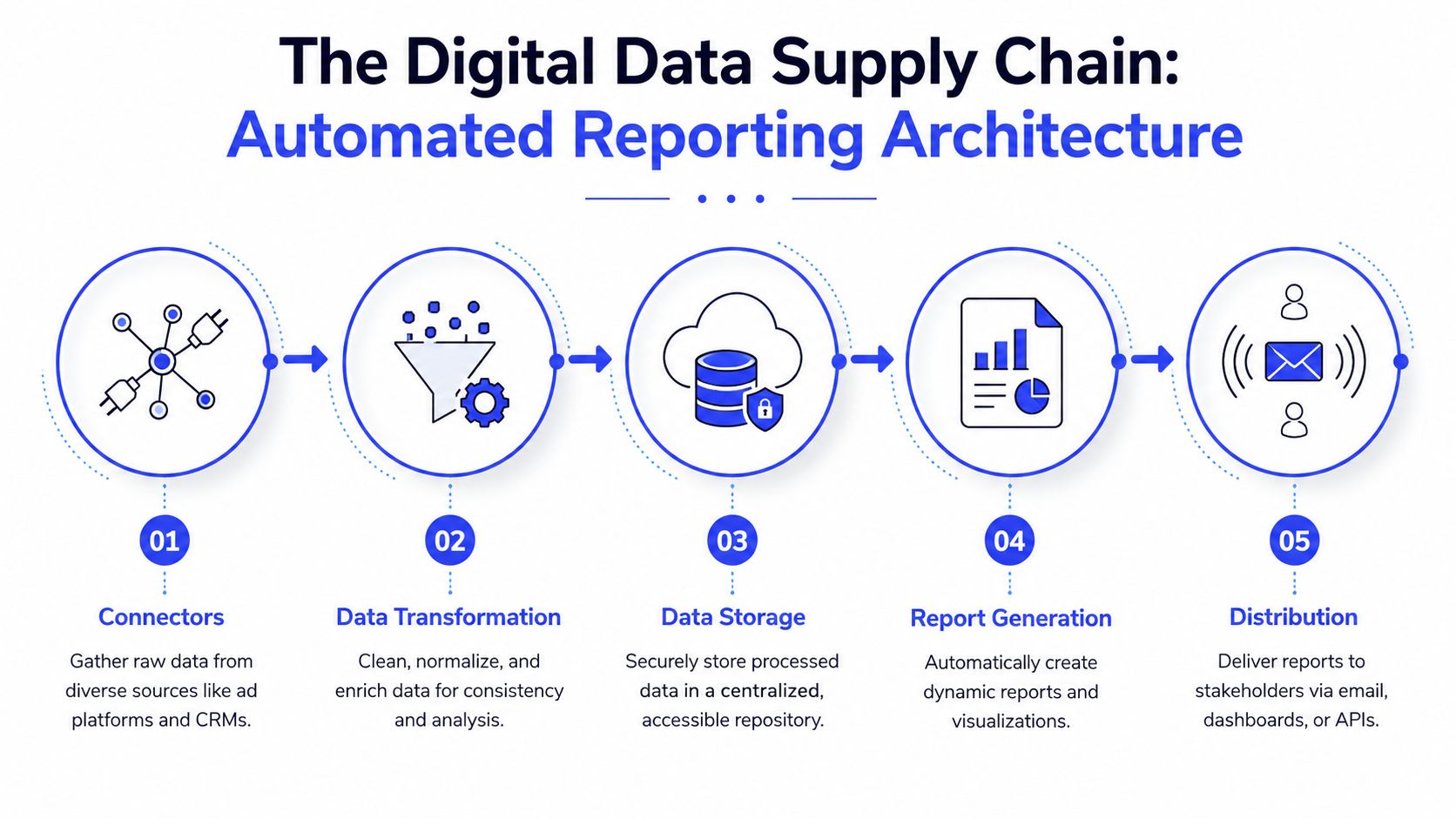
Reporting automation is often made to sound more technical than it needs to be. A better way to think about it is a digital data supply chain. Raw inputs come in, they get cleaned and standardized, they're stored somewhere reliable, and then they're turned into reports, alerts, and narratives the team can use.
Think of it as a data supply chain
A practical reporting engine usually has five layers:
Connectors
These pull from sources like Meta Ads Manager, Google Ads, TikTok, Shopify, a CRM, or a product analytics tool. The job here is reliability, not elegance. If connectors fail or permissions drift, the whole system becomes untrustworthy.Transformation
During transformation, raw data becomes usable. Campaign naming gets normalized. Currency fields are aligned. Attribution windows are handled consistently. Derived metrics get calculated.Storage
A warehouse or lakehouse gives the team one place to query clean historical data. Without this layer, teams stay trapped in platform-native views and fragmented exports.Report generation
Tools like Looker Studio, BI dashboards, or in-product reporting surfaces turn cleaned data into views for different stakeholders.Distribution
Scheduled emails, Slack summaries, APIs, and dashboards push information to the people who need it.
That middle layer is where most enterprise teams either gain trust or lose it. If transformation rules are sloppy, the dashboard just automates confusion. That's also why event design and tracking standards matter upstream. If you're tightening how conversion logic enters the system, AI-driven ad tracking with custom pixel events is worth reviewing because clean reporting starts with clean inputs.
Where AI belongs and where it does not
The strongest architecture pattern for 2026 is clear. All KPI calculations should happen in SQL or Python before any language model touches the data. The guidance in this reporting automation architecture framework is explicit that production-ready systems compute metrics before LLM interaction, then restrict the LLM to narrative synthesis so it doesn't hallucinate figures.
That design choice solves a real problem. Language models are good at summarizing trends and writing plain-English commentary. They are not the layer you want using formulas for spend, ROAS, pacing, or contribution math.
Operator note: Use code for math, use AI for explanation, and never swap those roles.
For collaborative ad management, this separation also helps governance. Analysts can validate the metric layer. Managers can trust the written summary. Creative and channel teams can discuss actions without debating whether the narrative invented a number.
Setting Up Smart KPIs and Proactive Alerts
A passive dashboard is useful. A proactive alerting system changes how the team works.

If the team still checks dashboards by habit, reporting automation hasn't gone far enough. True advantage comes when the system surfaces exceptions and routes them to the right person. That means buyers don't spend all day watching stable campaigns, and managers don't need to ask for status updates that the system should've provided on its own.
Derived KPIs are where many builds break
Standard metrics are easy. Spend, impressions, clicks, CTR, CPA, and ROAS already exist in most ad platforms. The trouble starts with derived KPIs. That's where teams define metrics like blended CPA, MER, contribution margin views, pacing formulas, or custom lead quality rollups across platforms.
These metrics are often the first thing to break when a manual spreadsheet becomes an automated pipeline. Formula logic gets copied inconsistently. Someone hardcodes a field. Another person changes naming conventions. Trust erodes fast.
Build derived KPI rules like product specs, not analyst preferences:
- Define metric ownership: Finance may own MER logic, while growth owns media efficiency formulas.
- Document input fields: Every KPI should list exactly which source fields it uses.
- State exceptions clearly: Refund handling, offline conversions, and timezone cutoffs need written rules.
- Test against known outputs: Compare automated results against a manually verified baseline before rollout.
Alerts should trigger action, not noise
The best alert systems are narrow, operational, and assigned. Each one should answer three questions: what changed, who owns it, and what happens next?
A few patterns work especially well for busy ad teams:
- Creative fatigue alerts: When a creative's CTR drops more than 40% from its launch-week baseline at a given frequency, it should be treated as fatigued and rotated. The guidance in this enterprise creative playbook also notes that AI systems can rotate replacements in hours rather than days.
- Budget pacing alerts: Trigger when spend is running ahead or behind plan far enough to require action from the buyer or finance partner.
- Efficiency floor alerts: Notify the owner when CPA, ROAS, or MER moves outside the acceptable operating band for that campaign type.
- Data integrity alerts: Flag missing source pulls, delayed refreshes, or broken joins before stakeholders see incomplete numbers.
Use a simple routing model for collaborative ad management. Buyers get channel alerts. Creative leads get fatigue alerts. Marketing ops gets data quality alerts. Leadership gets summaries, not noise.
After the rules are live, train the team on response behavior. The system should not just say "problem detected." It should help the team know whether to pause, rotate, escalate, or wait.
A short walkthrough helps teams understand what good alerting looks like in practice:
Good alerts reduce decision time because they package context with the issue, not because they send more notifications.
A Phased Implementation Roadmap for Your Team
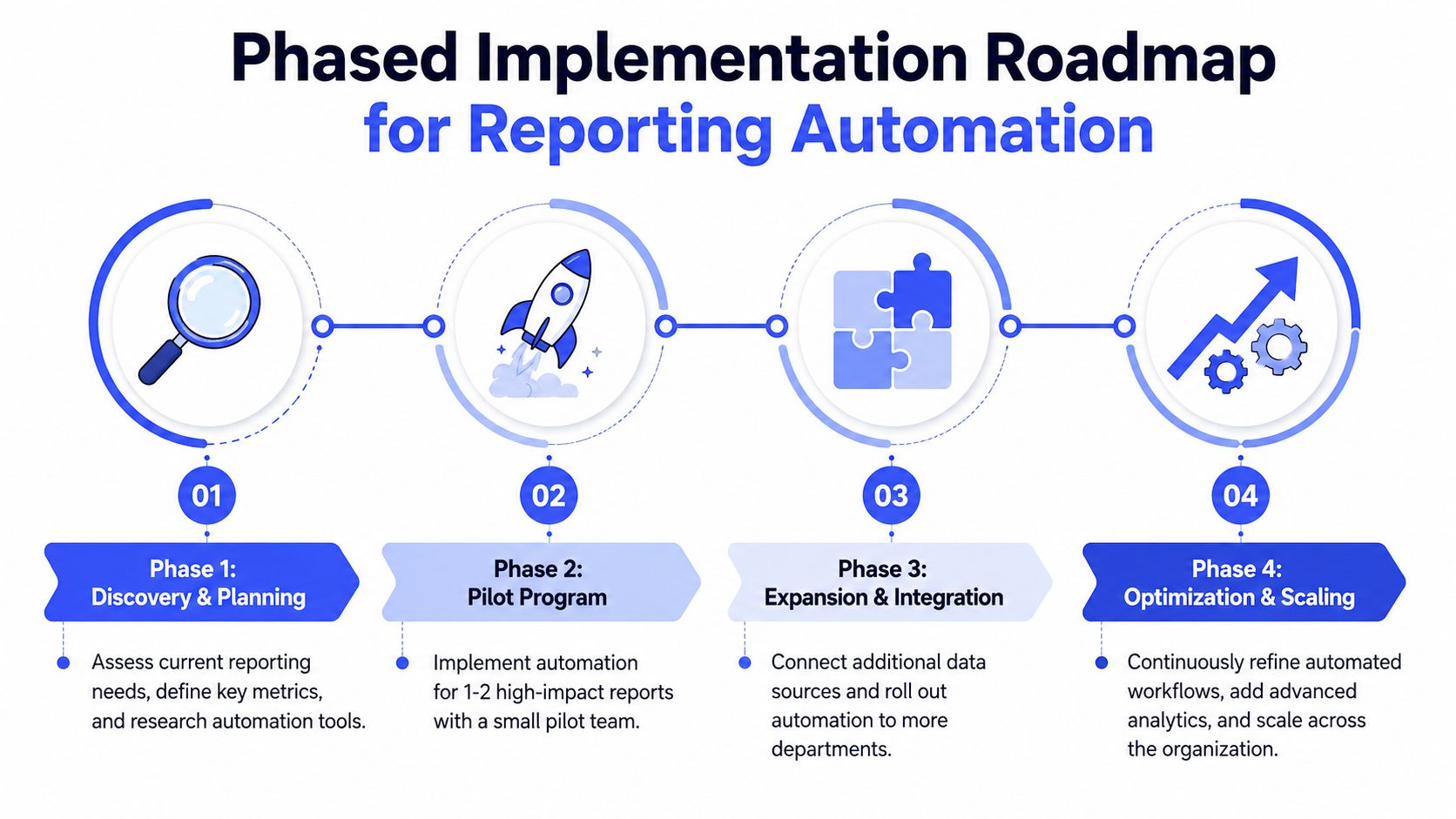
Teams get into trouble when they treat reporting automation like a big-bang rebuild. The cleaner approach is phased adoption. Build trust first. Expand scope second. Add intelligence only after the operating layer is stable.
Phase one and two build trust
Phase 1 is discovery and validation.
Start with one business question that matters. Usually that's pacing, efficiency, or leadership rollups. Map every source system, document field definitions, and agree on metric logic before any dashboard work begins.
Phase 2 is the core dashboard and report layer.
Build a narrow first version. One source of truth. One set of definitions. One stakeholder group that will engage with it. Don't begin with every region, every product line, and every channel if the team hasn't yet aligned on the basics.
A simple decision table helps:
| Phase | Primary goal | Common failure |
|---|---|---|
| Discovery and validation | Align definitions and source data | Building before metric logic is settled |
| Core dashboard build | Create trusted reporting views | Trying to satisfy every stakeholder at once |
For enterprise teams, this is also when cross-functional workflow design starts. Growth, analytics, finance, and creative operations should agree on who consumes which outputs and how handoffs happen. If automation won't fit the team's actual operating rhythm, the stack won't save it. Teams that are planning broader system handoffs often benefit from reviewing marketing automation integration patterns while they define those dependencies.
Phase three and four turn reporting into operations
Phase 3 introduces automated alerts and distribution.
Once the dashboard is trusted, move from passive visibility to exception handling. Route alerts into Slack, email, or task systems based on owner and urgency. Keep the first alert set small so people don't learn to ignore it.
Phase 4 adds advanced AI summaries and optimization support.
At this point, the team already trusts the metric layer. That makes narrative automation useful instead of risky. Summaries can highlight movement, emerging issues, and likely next actions without replacing the underlying data review.
There is one part of implementation that shouldn't be skipped: load and governance testing. A successful Build and Test phase spans Weeks 5–10, and pipelines should be load-tested with realistic data volumes to ensure completion in under 15 minutes for datasets exceeding 10 million rows, with every run logged for a complete audit trail, according to this implementation guidance for automated scheduled reports.
That matters for collaborative ad management because teams stop trusting a reporting system the moment it is slow, incomplete, or impossible to audit.
Governance and Scaling for Collaborative Ad Management
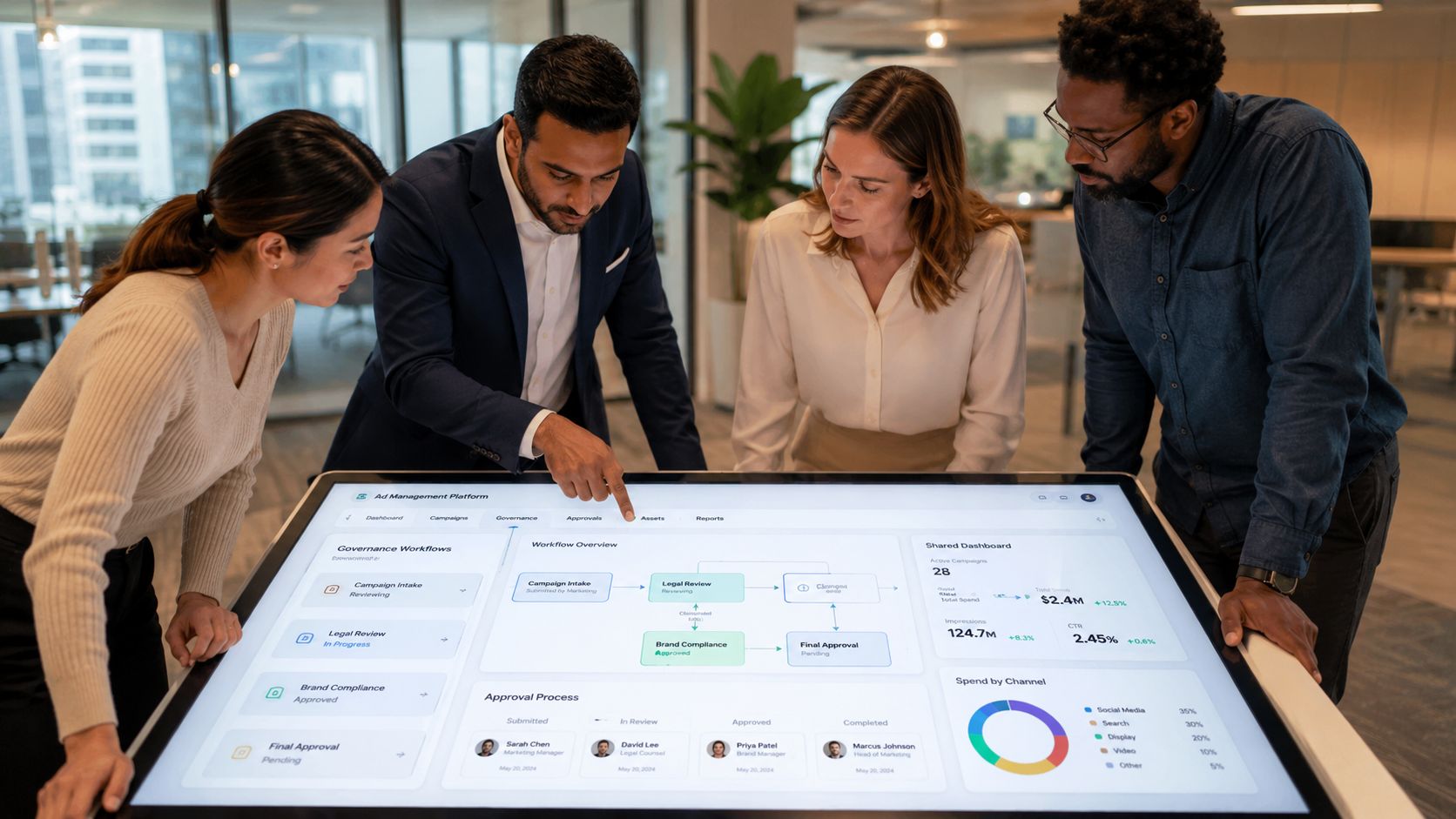
Automation fails when governance is weak. The dashboard might look polished, but if nobody knows who can change formulas, approve access, rotate creatives, or override alerts, the team ends up with a polished version of the same old confusion.
Governance is what makes automation usable
Enterprise teams need explicit operating rules around reporting automation. That usually starts with role separation:
- Media buyers should act on pacing, efficiency, and budget alerts.
- Creative teams should see performance signals tied to fatigue, placement behavior, and asset rotation needs.
- Analysts or marketing ops should own metric definitions, data QA, and pipeline issue review.
- Admins or team leads should control permissions, approval flows, and any automation rules that can change spend or publishing behavior.
Good governance also means setting hard boundaries for tactical automation. If the team uses AI agents or automated actions connected to ad platforms, guardrails matter. Read-only observation first. Then limited budget pacing. Then controlled creative rotation. Only after trust is established should the team consider broader execution rights. Spend caps, ad-level caps, and efficiency floors help keep collaborative oversight intact.
Automation should remove repetitive work, not remove accountability.
A team rhythm matters as much as the stack
The strongest enterprise setups combine automation with a stable communication cadence. According to this guide to enterprise ad team collaboration, teams rely on daily async Slack updates for overnight performance alerts and budget adjustments, plus weekly sync meetings under 30 minutes with a standard agenda covering performance, optimizations, creative pipeline, and upcoming launches.
That operating rhythm works because each forum has a job:
| Team motion | Best use |
|---|---|
| Daily async update | Overnight issues, budget changes, alert review |
| Weekly sync | Decisions, assignments, launch readiness, creative requests |
The mistake many teams make is treating reporting automation as an analytics project owned by one function. It isn't. For collaborative ad management, the report is the meeting input, the alert is the async trigger, and governance is what keeps everyone aligned when the system scales across brands, regions, and account structures.
Reporting Automation in Action Use Cases
Agencies
Agencies get the fastest win from monitoring alerts. Across a 10-client portfolio, prioritizing performance monitoring alerts saves 5–10 hours per week by replacing redundant manual oversight and helping teams respond faster, according to this breakdown of Meta ads automation for agencies. In practice, that means account managers stop refreshing dashboards to catch problems and spend more time on recommendations clients will notice.
Ecommerce brands
For ecommerce teams, reporting automation is most useful when it links media performance to creative rotation, merchandising, and operational constraints. The report shouldn't just say which ad set spent money. It should help the team decide whether to scale a winner, rotate an asset, hold spend on low-stock products, or shift budget to a stronger offer. That only works when growth, creative, and operations are looking at the same reporting layer.
Enterprise growth teams
Enterprise teams need a different model. They usually have multiple business units, more stakeholders, and stricter approval paths. Reporting automation works best here when the system standardizes metric definitions but distributes outputs by role. Leadership gets the rollup. Regional leads get diagnostics. Creative ops gets fatigue and asset readiness signals. Marketing ops monitors the health of the system itself.
The common thread is simple. Reporting automation is valuable when it shortens the path from signal to coordinated action.
Koast helps performance marketing teams replace tab-heavy ad workflows with AI-driven execution, centralized KPI tracking, shared creative operations, and governance features built for scale. If your team wants a faster way to launch, monitor, and optimize Meta ads without losing control, explore Koast.